
Understanding Custom Headers for Realms in OCOM
Oracle Communications Session Monitor (aka OCOM or EOM), formerly known as Palladion (still, even today, a personal favorite), is a fully multi-user capable architecture and offers powerful tools for managing access control for the users of the system, and one of the most underestimated options is its ability to use custom headers when defining the fundamental unit of access control: the Realm.
Now you may be thinking of Realms as they relate to an SBC and while they are similar conceptually, they serve entirely different purposes. In OCSM, a Realm is the fundamental way it regulates access to call data, allowing you to precisely limit what a user can see. A user bound to a Realm might as well have their very own ME server, only allowing them to see exactly those calls you wish them to be able to see.
Everything the user sees conforms to this: the raw call data; the KPIs. Even Registrations, as of 6.1.
So How Does This Work?
First you define a Realm, and give it a name.
Then you define what that Realm responds to, by creating one or more Realm Patterns attached to that Realm; for this, OCSM offers three patterns:
- Number ranges. EG: allow a user to see all calls attached to numbers from 719000000 to 719999999.
- Domains. EG: allow a user to see all calls attached to users on the domain teraquant.com.
- Finally, for ultimate flexibility, custom patterns. This is where you can have OCSM attach a call to a Realm based on just about anything you can imagine. Well, so long as it’s found inside a header in the SIP signaling, that is.
Additionally, you can declare as many Realm Patterns as you need, to declare different match criteria. Once either the caller or callee matches any pattern attached to a Realm, it will be considered part of that Realm.
Also, the patterns inside a single Realm Pattern are additive. So for instance, if you have both a number range and custom patterns declared inside a single Realm Pattern, then both must match for the call to be considered a match.
If you wanted to do an “either/or” pattern, it would be done by just declaring two patterns: one with only a numeric range, and a second with only custom patterns.
Individual Realm Patterns match on a first-come/first-served basis; once a pattern matches a call, the system stops checking the remaining Patterns attached to that Realm.
First you define a Realm, and give it a name, as seen in the first image.
Then you define what that Realm responds to, by creating one or more Realm Patterns attached to that Realm, shown in the second image; for this, OCSM offers three patterns:
- Number ranges. EG: allow a user to see all calls attached to numbers from 719000000 to 719999999.
- Domains. EG: allow a user to see all calls attached to users on the domain teraquant.com.
- Finally, for ultimate flexibility, custom patterns. This is where you can have OCSM attach a call to a Realm based on just about anything you can imagine. Well, so long as it’s found inside a header in the SIP signaling, that is.

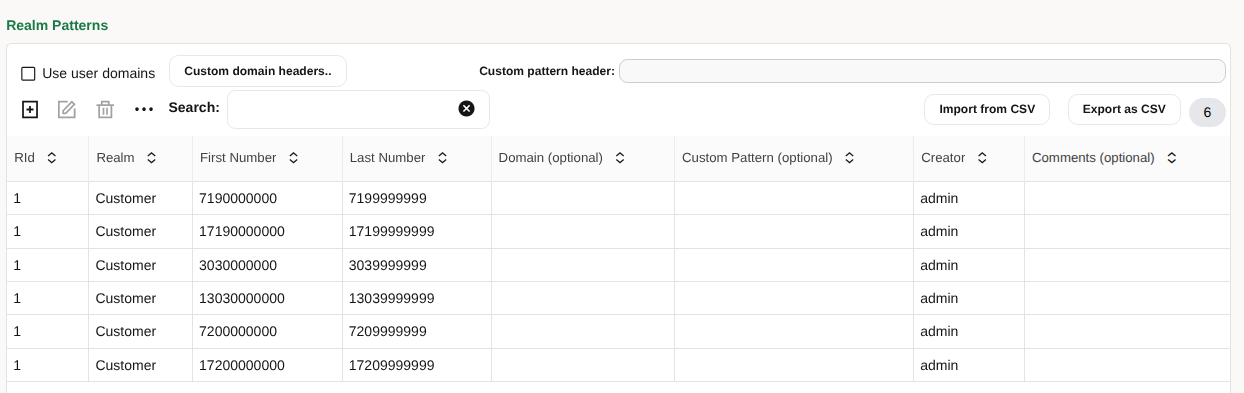
For this example, I am declaring only a simple set of numeric ranges.
Focusing on Custom Patterns
Custom patterns are powerful. First, they allow you to specify a set of up to 10 SIP headers that you want to potentially match on. This is done by opening the Settings dialog, then navigating to Realms > Realm Patterns. In the upper-right corner is a field titled Custom pattern header. Click on this field, and you will be presented with a new dialog where you can enter up to 10 discrete headers, in a space-separated list. Be careful with what you enter here, as these are going to be the headers that the system will search.
These are not case-sensitive, and you cannot repeat headers. The order you enter them will also be significant, so remember that.
Next create, or edit, a Realm Pattern. One of the options you can fill in is titled Custom Pattern. This is what we are focused on here.
This field is a little special. Like the Custom pattern header it uses a space-separated list to segregate the specific values that can be matched. Unlike that field, it also allows commas, to segregate each of the up to 10 headers you declared.
Each comma-separated group is tested against the corresponding custom header. There also must be as many groups here as are declared for the custom headers.
An Example
This is probably a little tricky to grasp, so let’s offer an example.
Let’s say we declare we want to match against 3 headers: “HeaderA HeaderB HeaderC”.
Next, we declare a Realm Pattern, and declare a Custom Pattern of “A B,B,C D”.

What this means is we have declared three groups:
- It’s critical that the number of groups declared matches the number of headers declared. So since we have three headers, we must declare three comma-separated groups.
- Group one matches against HeaderA, and matches the value of A or B. So any call where we find “HeaderA:A” or “HeaderA:B”.
- Group two matches against HeaderB, and matches the value of B. So any call where we find “HeaderB:B”.
- Finally group three matches against HeaderC, and matches the values of C or D. So any call where we find “HeaderC:C” or “HeaderC:D”.
- And because all three groups are declared, then we need at least one match from each group, for this call to be considered a match.
- If there’s no match needed on a specific header, it’s group is simply left empty.
So what can you use this for? You may have complex call flows where matching by the standard headers, or calling/called numbers is infeasible, or lacks the “resolution” you need.
One example would be to declare a custom header, using an HMR on your SBC to attach a specific header that identifies a specific customer: say X-Customer-ID:CO.
A custom header could then be configured to isolate that specific customer, placing “X-Customer-ID” into the Custom pattern header field, subject to the 10 header limit, and then declaring the specific value or values (in this example, that would be “CO”) you want that realm to react to in the Realm Patterns. And if 5 values isn’t enough to cover, simply declare additional patterns.
Complex Matching
Additionally, you can declare as many Realm Patterns as you need, to declare different match criteria. Once either the caller or callee matches any pattern attached to a Realm, it will be considered part of that Realm.
Also, the patterns inside a single Realm Pattern are additive. So for instance, if you have both a number range and custom patterns declared inside a single Realm Pattern, then both must match for the call to be considered a match.
If you wanted to do an “either/or” pattern, it would be done by just declaring two patterns: one with only a numeric range, and a second with only custom patterns.
Individual Realm Patterns match on a first-come/first-served basis; once a pattern matches a call, the system stops checking the remaining Patterns attached to that Realm.
Conclusion
Who this is for is service providers who service multiple customers, and they want to restrict what data their customers can see, while still allowing them full access to the OCSM system.
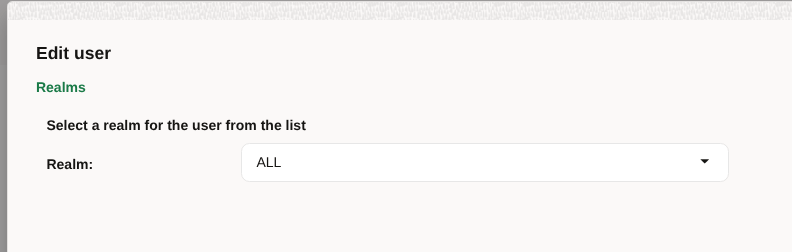
So how do we do this? Simple. Just edit their account under User Management, and on the second page you’ll see an option to define what realm they are attached to. There’s also a special “ALL” Realm which overrides this behavior, and lets them see all available data. It’s best to limit that to your local administrators and support desk.
OCSM release 6.1 also extends this realm-isolation capability to Registration events as well, so now, when your user is attached to a specific Realm, even the Registration events will be constrained to only show those events that correspond to that user’s defined Realm.
If you would like to know more about the subjects in this article, please get in touch as below.
For more information, view:
SIP Monitoring VoIP for Telco CSPs